|
Leitmotif |
|
Leitmotif |
 |
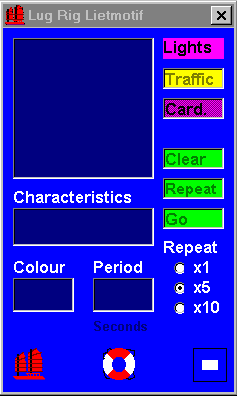
| Leitmotif is both a learning and an on-board navigation aid. It shows the actual sequences (and meanings where appropriate) for lights on buoys and marks, cardinal lights and port traffic lights. Enables light characteristics to be entered directly from charts and pilot chartlets. The program includes full Windows Help support. Download from here. |
|
Standard
Leitmotif window for bouys and marks. Click the Traffic button to extend the window to show information about Port Traffic Lights. Click on the Card. button to extend the window to show information about Cardinal lights. Click the Lights button to close the above extensions. |
Action |
Result |
| Enter light characteristics from chart and click Go. | Display the sequence 5 times |
| Click Repeat | Repeats the sequence 5 times |
| Enter Colour | Displays sequence in selected colour. (Defaults to White.) |
| Enter Period (in seconds) | Overrides default period for sequence |
| Click Clear | Clears the text boxes prior to entry of a new sequence |
| Click x1, x5 or x10 buttons under "Repeat" | Selects repeat loop required. (Defaults to x5.) |
| Click on |
Displays information about Lug Rig Software |
| Click Lifebuoy | Activates Windows Help for Leitmotif Includes full list of abbreviations used on charts. |
| Click on Papa flag (Blue Peter) | Leave Leitmotif |