



Now, if you've had a look around this site you'll know that I'm not one to blow my own trumpet. But I quite like this. Why not e-mail me (from the links page) to tell me how crap you think it is.
It's another bitmap slideshow type screen saver. Oh no. Ah, yes, but this one's good. And free. Download the 'fade32.zip' (from the link above) file and extract the 'fade32.scr' file to your Windows/System directory. You'll also need the JPEG handling library which you can get from here
 ,
from this file unzip the 'gfxlib.dll' file, also to your Windows/System directory (or whatever
the equivalent is under NT) and you're away.
,
from this file unzip the 'gfxlib.dll' file, also to your Windows/System directory (or whatever
the equivalent is under NT) and you're away.Oh, you'll need some appropriate pictures, JPEGs are good, have a hunt around the links page for some dubious sites which will supply you with the goods.
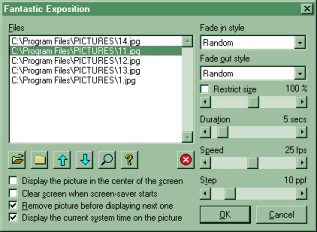
Use the Display Properties dialog (you know the score) to choose the 'Fantastic Exposition' screen saver and click the 'Settings...' button. Use the 'Open' file and 'Close' file icons to add and delete pictures from the list, from the 'File Open' dialog you can select multiple files, see the bit of this site that talks about the JPEG library for the file types that are supported. If you're feeling frisky you can just drag and drop files from Explorer onto this list. Use the arrows to change the order of the available pictures. Click the question-mark for a dead simple help dialog. I should leave the controls as standard for starters, have a play around a bit later. Click the 'OK' button and Bob's your uncle.
Here's the control panel you should see if my instructions are decypherable. Isn't she a beauty?
If you want to jigger about with the code then feel free, it's mostly all in the zip file, except for the 'gfxlib' stuff which you'll have downloaded anyway to get the screen saver working. The code that I've actually given you is slightly out of date and won't build the screen saver exactly the same as the pre-built one provided. I'd like to say that this is intentional so's I don't give away all my secrets, but it's not, I'm a blundering fool and I've lost the latest version of the source. Ho-hum.
