



Here's how I reckon it's possible to do a tree control without using MFC or C++. P'raps I just do it like this 'cos I don't understand all this Object Oriented gubbins.
Anyway. The demo's got the source code with it so you can have a look if you like. If you try to build it make sure to include "comctl32.lib" in your project. The vital bits of the C code (for doing MFC controls without MFC) are the inclusion of the "commctrl.h" file and the call to "InitCommonControls()" in the "WinMain" function. Have a look at the "ImageList_" and "TreeView_" macros/functions they're a bit groovy (and quite important) as well.
This is just a demo of how a tree control works, it doesn't actually do anything. Once you've got it up and running you should be able see something like this.
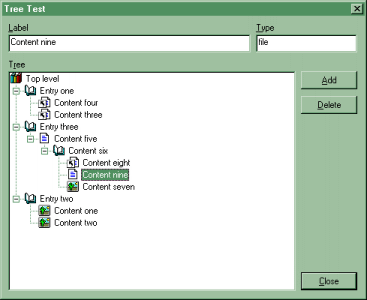
The two edit controls are for you to control what gets added to the tree when you click the "Add" button. The first box is just the label of the item in the tree. The second one lets you set the type of item you want adding (so you can see the "ImageList_" stuff working) and can be set to "picture", "link", "file" or anything else.
Have a play around. This was originally intended to be merged with the web demo stuff into an automatic web-site analyser and batch downloader. But I've not yet got 'round to it. Any offers?
